Att installera en oregelbunden LED-display är inte en enkel monteringsuppgift. Den kräver en samordnad ansats som kombinerar maskinteknik, elektrisk design och mjukvarukalibrering . Till skillnad från standardplatta skärmar kräver oregelbundna LED-skärmar precision anpassning och strukturell stabilitet i varje led av värdekedjan.
Den här guiden går igenom en fullständig installationsarbetsflöde , från planering till slutlig godkännande, med praktiska tips för olika skärmtyper.
Fas 1: Förinstallationens planering och strukturella installation
1. Platsundersökning och detaljerad design
Börja med en omfattande platsinspektion mät allt noggrant och utvärdera:
- Bärförmåga för väggar eller golv
- Omgivningstemperatur och luftfuktighet
- Platser för elanslutning och routningsvägar
Justera därefter med tillverkarens dokumentation:
- Konstruktionsritningar
- Förnumrerade LED-moduler (t.ex. "Övre vänstra böjda modulen A-01")
Detta numreringssystem gör det möjligt for installatörer att placera varje modul exakt utan att gissa .
2. Stålkonstruktion och rammontering
Den bärande konstruktionen avgör hela skärmens pålitlighet. Du måste säkerställa extrem precision under monteringen .
Huvudsakliga krav:
- Använd lasersnivåer och 3D-mätverktyg
- Kontrollera toleransen inom ≤ 0,5 mm
Installationstips efter skärmtyp
Böjda / vågformade skärmar
- Anpassa exakt krökningsradie från designen
- Undvik att tvinga moduler på plats
Överdriven spänning kan orsaka deformation eller LED-fel
Sfäriska ledskärmar
- Dela upp konstruktionen i övre och undre halvklot
- Fäst den undre konstruktionen med expansionsbultar (≥ 15 cm djup)
- Suspendera den övre konstruktionen med takmontering
- Minimikrav: 3 upphängningspunkter per m²
Kolumn-/pelardisplayar
- Bygg först en armerad betonggrund
- Installera stålkolonner efter avhärdning
- Säkerställ korrekt jordning:
Fas 2: Modulinstallation och kablingsanslutning
1. Installation av LED-moduler och skåp
Olika oregelbundna displayar kräver olika installationsmetoder.
Flexibla LED-moduler (böjda, cylindriska, vågformade)
- Använd magnetisk montering eller flexibla underlagsskivor
- Installera från en riktning (från botten och uppåt eller sida till sida)
- Tryck fast modulerna ordentligt med rullar för att eliminera luftfickor
Kritiska begränsningar:
- Minsta böjradie (t.ex. R200 mm / R500 mm )
- Maximal böjningsvinkel: ≤ 90°
Böj aldrig modulerna för mycket – detta är en av de vanligaste orsakerna till fel.
Sfäriska / polygonala kabinetter
- Använd kabinetter med anpassad form (triangulära eller trapetsformade)
- Förmontera strömförsörjningar och mottagarkort inuti kabinetternas
Installationsordning:
- Sammansätta lager för lager (ring för ring)
- Kontrollera justeringen efter varje lager
- Håll sömsketter ≤ 2 mm
Förskjutna och roterade installationer
Oregelbundna skärmar kräver ofta:
- Förskjuten placering
- 90° rotation
Fokusera endast på säker fysisk installation i detta skede.
Du justerar visuell justering senare via programvara.
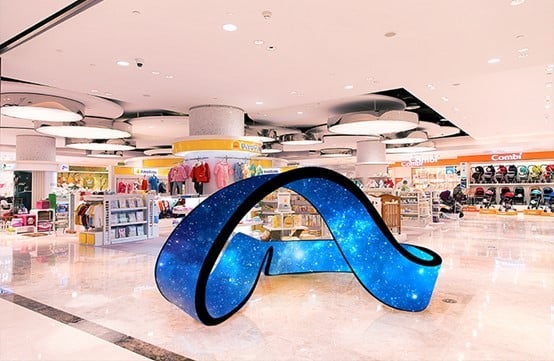
2. Ström- och signalkablar
Distribuerad strömförsörjningsdesign
Undvik centraliserade strömförsörjningssystem.
- Placera strömförsörjningar nära lasten
- Minska spänningsfallet över långa avstånd
Störningsimmun kablingsutförande
- Separera kraft- och signalkablar (≥ 10 cm avstånd )
- Lägg signalkablarna längs stålkonstruktionen
- Håll dem borta från högspänningsledningar
För transmission över långa avstånd:
- Använd fiberoptik eller skärmade Ethernet-kablar
Detta förhindrar:
- Signalstörningar
- Skärmflimmer eller svart utbildning
Fas 3: Programvarukonfiguration och bildkalibrering
När strömmen är påslagen visar oregelbundna LED-skärmar sällan korrekt vid första försöket. Du kommer troligen att se:
- Bildrivning
- Felinriktning
- Förvrängning
Detta är normalt. Nu går du över till programvarukorrigering .
1. Inledande inställning
- Anslut kontrollsystemet till en dator
- Använd professionell programvara såsom:
Importera skärmkonfigurationsfilen.
För roterade moduler:
- Möjliggöra rotationsinställningar (t.ex. vertikal avskanning eller vinkeljustering)
2. Kabinettmappning (pixelmappning)
Använd verktygen "Kabinettskonstruktion" eller "Redigering av oregelbunden skärm".
Process:
- Följ den faktiska fysiska kablingsordningen
- Mappa varje modul manuellt
- Definiera pixelförbindelser och sekvens
Noggrannheten här påverkar direkt bildens integritet.
3. Finjustering av position
Korrigera fysisk feljustering digitalt:
- Välj enskilda moduler
- Justera positionen med tangentbordet eller musen
Använd testmönster:
Mål: sömlös kontinuitet över hela skärmen
4. Geometrisk korrigering och färgkalibrering
Geometrisk korrigering
För böjda eller sfäriska skärmar:
- Verkställ innehållsdeformation (omvänd förvrängning)
- Förhindra sträckta eller snedvridna visuella effekter
Kalibrering av färg och ljusstyrka
Kantmoduler verkar ofta inkonsekventa på grund av betraktningsvinklar.
- Utföra kalibrering på pixelnivå
- Justera ljusstyrka och krominans individuellt
Detta säkerställer en enhetlig visuell utdata.
Fas 4: Slutlig granskning och godkännande
Innan överlämning utförs en fullständig systemvalidering.
1. Visuell testning
Kör flera testscenarier:
- Enfärgade färger (röd, grön, blå, vit)
- Gråskalegradienter
- Dynamiskt videoinnehåll
Kontrollera:
- Döda pixlar
- Mörka fläckar
- Färgbandning
- Blinkande
2. Säkerhetsinspektion
Verifiera:
- Alla skruvar och fästdon är säkert åtdragna
- Ingen blottad kablingsanläggning
- Jordningssystemet är korrekt anslutet
3. 72-timmarsåldringstest
Kör skärmen kontinuerligt i 72 timmar .
Skärm:
- Systemstabilitet
- Termiska prestanda
- Värmeackumuleringsområden (särskilt hörn och trånga vinklar)
Lägg särskild vikt vid värmeackumuleringszoner , vilka ofta förekommer i oregelbundna konstruktioner.
Slutföranden
Installation av oregelbundna LED-skärmar skiljer sig grundläggande från installation av standardskärmar. Den kräver:
- Nogsint Teknik
- Omsorgsfull sekvensering
- Avancerad programvarukorrigering
Om du utför varje fas korrekt kommer du att uppnå:
- Sammanhängande visuella effekter
- Pålitlighet på lång sikt
- Säker drift
I oregelbundna LED-projekt beror framgången både på fysisk noggrannhet och digital kalibrering.
Viktiga saker att lära sig
- Börja alltid med exakta platsmätningar och strukturell design
- Upprätthåll strikt toleranskontroll (≤ 0,5 mm)
- Respektera modulernas böjgränser för att undvika skador
- Använd distribuerad kraftförsörjning och störningsäkra kablar
- Lita på programvara för slutlig justering och korrigering
- Utför fullständig testning, inklusive en 72-timmars åldringstest

 EN
EN
 AR
AR
 BG
BG HR
HR
 CS
CS
 DA
DA
 NL
NL
 FI
FI FR
FR
 DE
DE EL
EL
 HI
HI
 IT
IT JA
JA
 KO
KO
 NO
NO PL
PL PT
PT RO
RO
 RU
RU
 ES
ES
 SV
SV
 TL
TL
 ID
ID
 SR
SR
 UK
UK VI
VI
 ET
ET
 HU
HU
 TH
TH
 TR
TR
 FA
FA
 AF
AF
 MS
MS
 GA
GA
 HY
HY
 AZ
AZ
 MN
MN
 UZ
UZ











