Instalacja nieregularny wyświetlacz LED nie jest prostym zadaniem montażowym. Wymaga skoordynowanego podejścia łączącego inżynierię mechaniczną, projektowanie elektryczne oraz kalibrację oprogramowania w przeciwieństwie do standardowych płaskich ekranów nieregularne wyświetlacze LED wymagają precyzyjnej personalizacji i stabilności konstrukcyjnej na każdym etapie.
Ten przewodnik przeprowadzi Cię przez pełny cykl instalacji , od etapu planowania po końcowe przyjęcie robót, zawierając praktyczne wskazówki dotyczące różnych typów ekranów.
Faza 1: Planowanie przed instalacją oraz przygotowanie konstrukcji
1. Badanie terenu i szczegółowy projekt
Zacznij od kompleksowe badanie terenu zmierz wszystko dokładnie i dokonaj oceny:
- Nośność ścian lub podłogi
- Temperatura i wilgotność otoczenia
- Lokalizacje źródeł zasilania oraz trasy ich prowadzenia
Następnie dopasuj się do dokumentacji producenta:
- Rysunki konstrukcyjne
- Wstępnie ponumerowane moduły LED (np. „Moduł zakrzywiony w lewym górnym rogu A-01”)
Ten system numeracji pozwala instalatorom dokładnie umieścić każdy moduł bez konieczności zgadywania .
2. Montaż konstrukcji stalowej i ramy
Konstrukcja nośna określa niezawodność całego ekranu. Należy zapewnić skrajną precyzję podczas montażu .
Podstawowe wymagania:
- Korzystaj z poziomic laserowych i narzędzi do pomiaru 3D
- Kontroluj tolerancję w zakresie ≤ 0,5 mm
Wskazówki dotyczące montażu w zależności od typu ekranu
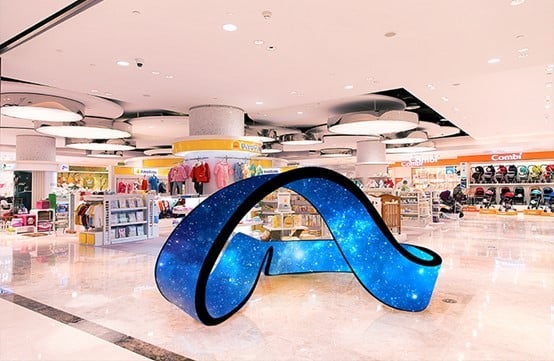
Ekrany wygięte / faliste
- Dopasuj dokładny promień krzywizny z projektu
- Nie wymuszaj montażu modułów w odpowiedniej pozycji
Nadmierny nacisk może spowodować odkształcenie lub awarię diod LED
Ekrany led kuliste
- Podziel konstrukcję na górną i dolną półkulę
- Zamocuj dolną konstrukcję za pomocą kołków rozporowych (głębokość ≥ 15 cm)
- Zawieś górną konstrukcję przy użyciu systemu zawieszenia sufitowego
- Minimalnie: 3 punkty zawieszenia na 1 m²
Wystawy kolumnowe / słupowe
- Najpierw zbuduj fundament z betonu wzmocnionego
- Zainstaluj stalowe kolumny po utwardzeniu betonu
- Zadbaj o prawidłowe uziemienie:
- Opor względem ziemi < 4 Ω
Faza 2: Montaż modułów i okablowanie
1. Montaż modułów LED i szafek
Różne nieregularne wyświetlacze wymagają różnych technik montażu.
Elastyczne moduły LED (krzywoliniowe, cylindryczne, faliste)
- Zastosuj montaż magnetyczny lub elastyczne taśmy klejące
- Montuj w jednym kierunku (od dołu do góry lub od strony do strony)
- Wciśnij moduły mocno za pomocą wałków, aby usunąć przestrzenie powietrzne
Kluczowe ograniczenia:
- Minimalny promień gięcia (np. R200 mm / R500 mm )
- Maksymalny kąt gięcia: ≤ 90°
Nigdy nie giń modułów ponad dopuszczalny kąt — jest to jedna z najczęstszych przyczyn awarii.
Kabinety sferyczne / wielokątne
- Używaj kabinetów o niestandardowym kształcie (trójkątnych lub trapezoidalnych)
- Wstępna instalacja zasilaczy i kart odbiorczych wewnątrz kabinetów
Kolejność montażu:
- Złożyć warstwa po warstwie (pierścień po pierścieniu)
- Sprawdzaj wyrównanie po każdej warstwie
- Zachowaj szczeliny szwów ≤ 2 mm
Montaż przesunięty i obrócony
Nieprawidłowe ekrany często wymagają:
- Przesuniętego umieszczenia
- obrót o 90°
Skup się wyłącznie na bezpiecznym fizycznym zamocowaniu w tym etapie.
Wyrównanie wizualne skorygujesz później za pomocą oprogramowania.
2. Przewody zasilania i sygnału
Rozprojektowane zasilanie
Unikaj scentralizowanych systemów zasilania.
- Umieść zasilacze w pobliżu obciążenia
- Zmniejsz spadek napięcia na dużych odległościach
Przewody odporno na zakłócenia
- Oddziel przewody zasilające od przewodów sygnałowych (≥ 10 cm) )
- Kładź przewody sygnałowe wzdłuż konstrukcji stalowych
- Trzymaj je z dala od linii wysokiego napięcia
Dla transmisji na duże odległości:
- Zastosowanie włókna optyczne lub ekranowane kable Ethernet
To zapobiega:
- Interferencje sygnału
- Migotanie lub wyłączenie ekranu
Faza 3: Konfiguracja oprogramowania i kalibracja obrazu
Po włączeniu zasilania nieregularne ekrany LED rzadko wyświetlają obraz poprawnie od razu. Najprawdopodobniej zaobserwujesz:
- Rozdarcie obrazu
- Niewspółosiowość
- Zniekształcenie
Jest to zjawisko normalne. Teraz przechodzisz do etapu korekcja oprogramieniowa .
1. Pierwszej konfiguracji
- Podłącz system sterowania do komputera
- Użyj profesjonalnego oprogramowania, takiego jak:
Zaimportuj plik konfiguracji ekranu.
Dla modułów obróconych:
- Umożliwić ustawienia obrotu (np. skanowanie pionowe lub dostosowanie kąta)
2. Mapowanie szafek (mapowanie pikseli)
Użyj narzędzi „Konstrukcja szafki” lub „Edycja nieregularnego ekranu”.
Proces:
- Postępuj zgodnie z rzeczywista fizyczna kolejność okablowania
- Ręczne mapowanie każdego modułu
- Zdefiniuj połączenia i kolejność pikseli
Dokładność w tym miejscu ma bezpośredni wpływ na integralność wyświetlania.
3. Precyzyjne dopasowanie pozycji
Korekcja fizycznego niezgodnego ustawienia w sposób cyfrowy:
- Wybierz poszczególne moduły
- Dostosuj położenie za pomocą klawiatury lub myszy
Użyj wzorów testowych:
- Linie celownika
- Linie siatki
Cel: bezszwowa ciągłość na całym ekranie
4. Korekcja geometryczna i kalibracja kolorów
Korekcja geometryczna
Dla ekranów zakrzywionych lub sferycznych:
- Zastosuj zniekształcanie treści (odwrotne zniekształcenie)
- Zapobieganie rozciągnięciu lub zniekształceniu obrazu
Kalibracja kolorów i jasności
Moduły krawędziowe często wyglądają niespójnie ze względu na kąty widzenia.
- Wykonywać kalibrację na poziomie pikseli
- Dostosuj jasność i chromatyczność indywidualnie
Gwarantuje to jednolity efekt wizualny.
Faza 4: Ostateczna inspekcja i akceptacja
Przed przekazaniem przeprowadź pełną walidację systemu.
1. Testy wizualne
Uruchom wiele scenariuszy testowych:
- Kolorowe płaszczyzny (czerwień, zieleń, niebieski, biały)
- Gradienty szarości
- Dynamiczna zawartość wideo
Sprawdź:
- Martwe piksele
- Plamy ciemne
- Paskowanie kolorów
- Migotanie
2. Kontrola bezpieczeństwa
Sprawdź:
- Wszystkie śruby i elementy mocujące są dobrze dokręcone
- Brak odsłoniętych przewodów
- System uziemienia jest prawidłowo podłączony
3. 72-godzinny test starzenia
Uruchom ekran w trybie ciągłej pracy przez 72 godziny .
Monitoruj:
- Stabilność Systemu
- Wykonanie termiczne
- Obszary gorących punktów (szczególnie narożniki i ostre kąty)
Zwracaj szczególną uwagę na strefy gromadzenia ciepła , które często występują w konstrukcjach nieregularnych.
Wnioski
Nieregularna instalacja wyświetlacza LED różni się zasadniczo od standardowych ekranów. Wymaga ona:
- Inżynieria precyzyjna
- Dbałej sekwencji
- Zaawansowanej korekcji oprogramowania
Jeśli poprawnie wykonasz każdą fazę, osiągniesz:
- Bezszwowe obrazy
- Wiarygodność długoterminowa
- Bezpieczna obsługa
W nieregularnych projektach LED sukces zależy zarówno od dokładności fizycznej, jak i kalibracji cyfrowej.
Kluczowe wnioski
- Zawsze zaczynaj od precyzyjnego pomiaru miejsca instalacji oraz projektowania konstrukcji
- Ścisłe przestrzeganie tolerancji (≤ 0,5 mm)
- Zachowanie granic gięcia modułów w celu uniknięcia uszkodzeń
- Zastosowanie rozproszonego zasilania oraz przewodów odpornych na zakłócenia
- Wykorzystanie oprogramowania do końcowej wyrównania i korekcji
- Przeprowadź pełne testy, w tym 72-godzinny test starzenia


 EN
EN
 AR
AR
 BG
BG HR
HR
 CS
CS
 DA
DA
 NL
NL
 FI
FI FR
FR
 DE
DE EL
EL
 HI
HI
 IT
IT JA
JA
 KO
KO
 NO
NO PL
PL PT
PT RO
RO
 RU
RU
 ES
ES
 SV
SV
 TL
TL
 ID
ID
 SR
SR
 UK
UK VI
VI
 ET
ET
 HU
HU
 TH
TH
 TR
TR
 FA
FA
 AF
AF
 MS
MS
 GA
GA
 HY
HY
 AZ
AZ
 MN
MN
 UZ
UZ










